

Who Bought This Also Bought
Automatic Related Products for Magento 2 is also available
Easy and reliable setup for related products.
-
- Relevance insured via smart selection algorithm
- "Same category" option to narrow a selection
- Fast cache providing minimum load time


Who Bought This Also Bought Gallery
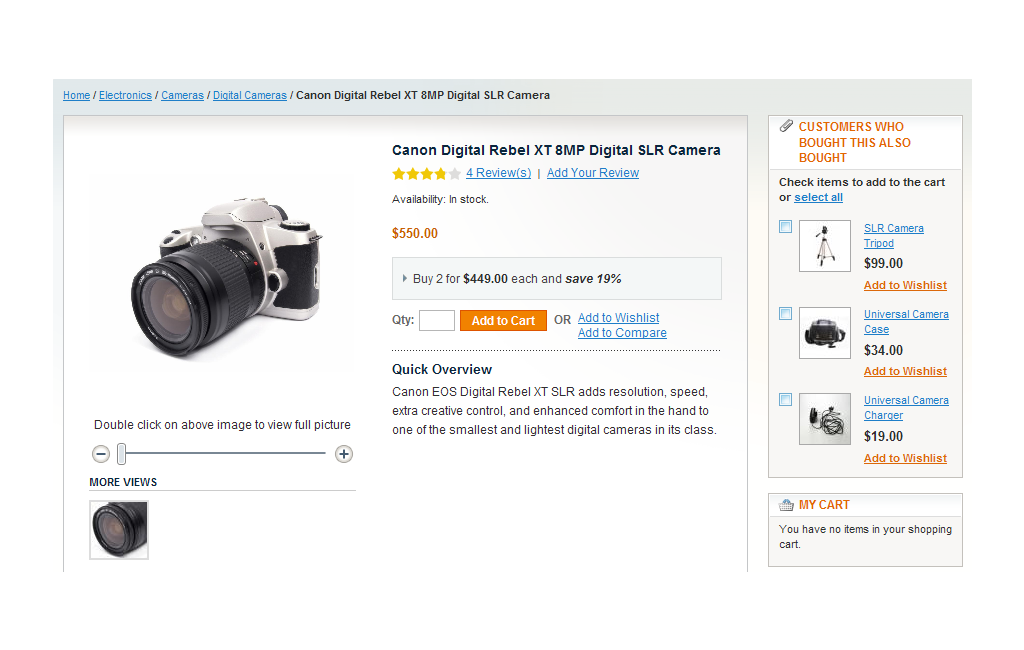
Overview
Recommendation software plays on the human tendency to be influenced by what others have done. You can influence your customers to spend more on products from your store easily by leveraging the ease and power of our Who Bought This Also Bought extension. Not only does such contextual display of additional content make your store more intelligent, it gives your customers a genuine idea of other products that might be useful to them. And when they are in the mood to buy, a glimpse of related popular products is all they need to shell out more money.
If your store has more than a few products, it is imperative that you automate recommendation of related products. The ‘Who Bought This Also Bought’ extension helps you do just that by intelligently capturing customer intent and behavior as they add products in to their shopping basket. This vital intelligence is then processed to form the highly targeted set of related items to display for customers who are contemplating similar purchases.
Enrich your store pages and cross-sell more effectively. See below to find out why this product can make such a huge difference to your sales.
Note: the Who Bought This Also Bought extension displays all the product types in its block. However, only Simple and Virtual products can be added to cart from the extension's block. Items of other types can only be added from the corresponding product pages.
Features
Flexible configuration of products displaying
- Show products from one category only
You can specify whether items will be taken from the current category only or from the whole store. - Number of products to display
This option allows you to define how many products will be displayed in the Who Bought This Also Bought block. - Ability to choose order statuses for processing
You are able to define which status (or statuses) the products should have to be displayed in the block.
Powerful intelligence to maximize cross-selling
The extension ensures that items with the highest rate of cross selling are recommended; items that are purchased occasionally are not randomly displayed, thus offering an error-free and perfect set of related products.
Super-fast extension cache
Ensures that your pages continue to load fast, not only contributing to a great user experience but also preventing any issues with search engines related to page load times.
-
1.4.4+ Compatibility with Automatic Related Products 2
* Problem with the number of products displayed in the block when items from the same category could be shown only
* 'Select all' link wasn’t hidden when all products were shown in the block -
1.4.3* Product relations were not updated after order completion
* Incompatibility with RWD theme -
1.4.2* Incompatibility with 1.8.1.0 CE
* Compatibility issue with AJAX Cart Pro -
1.4.1+ Stability and speed improvements
-
1.4.0+ Shopping Cart Block
* Issue with orders created from backend -
1.3.0+ Magento PE compatibility
* Incorrect order filter applied to related products -
1.2.0+ "Show products from one category only " option
+ "Number of products to display" option
+ Ability to choose order statuses for processing
* Incorrect work with bundle products
* Incorrect work with multiple stores -
1.1.1+ Magento Enterprise compatibility
* installation procedure bugfix -
1.1.0+ Stability and speed improvement