

Search Autocomplete and Suggest
Allow autocomplete search input and provide result suggestions.
- AJAX technology provides fast live updates
- Customize the look of "suggest" area
- Exclude irrelevant attributes and out of stock items


Search Autocomplete and Suggest Gallery
Overview
Finding a desired product in the shortest time possible is crucial for your conversion rate and overall customer experience. Some customers prefer going through the navigation tree, while others cut straight to the chase and try their luck with the search tab. For the latter we have just the thing.
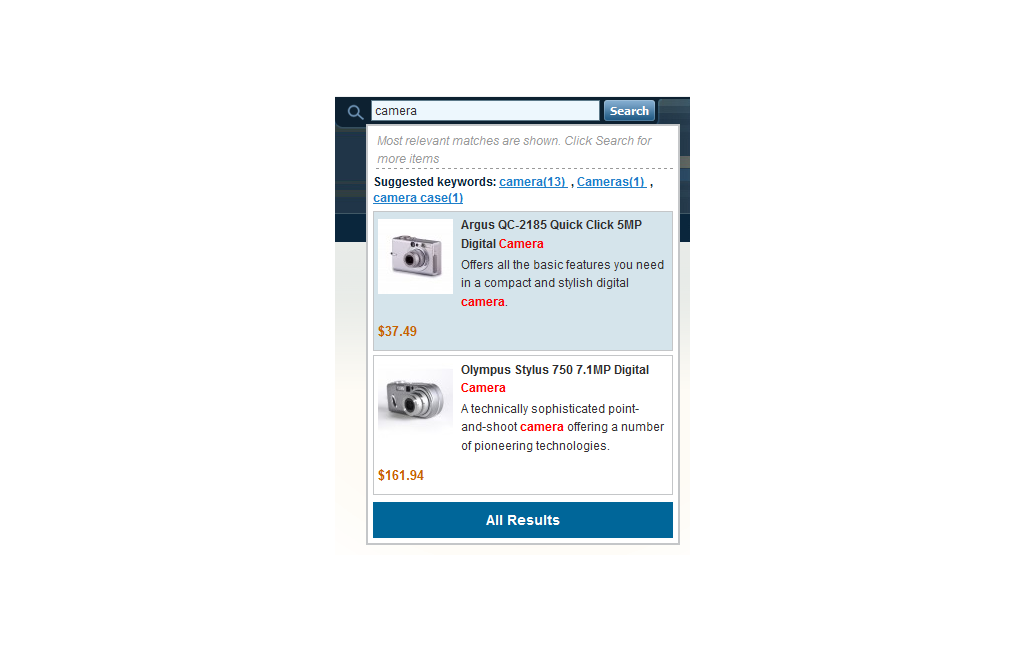
Our Magento Search Autocomplete & Suggest extension provides customers with a dropdown of destination suggestions once they are past typing the third symbol in the search field, allowing them to jump to relevant products without going through the search result page. Additionally, the drop down tab includes matching keywords to guide the search in the direction of most results.
Features
Customized look
You can specify the number of Magento search suggestions to appear in the dropdown, write your own messages to be displayed at the top and bottom of search results, and create your own dropdown template.
Relevant suggestions
The type of information you think is irrelevant may be excluded from the description of suggested items, also, out of stock items may be eliminated from results.
Search aids
Customers may be suggested keywords related to what they are typing to narrow the results and/or allowed to search by product tags for more liberal results.
Live updates
AJAX based search works extremely fast, finding suggestions as you go, but we allow setting up a custom update delay in case you don’t want continuous search response to be too distracting.
How Search Autocomplete & Suggest differs from Advanced Search
Search Autocomplete & Suggest is based on native Magento search functionality whileAdvanced Search replaces this functionality by bringing the power of external search engine to your store.
Both Magento search extensions can easily work together - when installed on the same website, Search Autocomplete & Suggest can use Magento Advanced Search as its search engine.
-
3.4.8* Manage Stock Option issue
* Product attributes display adjustments
* Built-in search engine improvements -
3.4.7Stability and speed improvements
-
3.4.6* If synonym is entered, keyword is not shown in dropdown
* "Not Visible Individually" products are displayed when using Advanced Search as search engine -
3.4.5+ Compatibility with AJAX Cart Pro
* Search results disappeared on any element click -
3.4.4* Minor bugfixes
-
3.4.3* Problem with "short_description" attribute
* Text in Customer Service CMS page floated to the left -
3.4.2* Incorrect position of the preloader image in the Search field
* Incorrect position of the popup window with search results
* Incorrect look of the popup window -
3.4.1* Incorrect search when both “Name” and “Description” attributes were selected
-
3.4.0+ Suggested Keywords
+ "All Results" button -
3.3.5* Minor bugfixes
-
3.3.4+ Stability and speed improvements
-
3.3.3+ Stability and speed improvements
-
3.3.2+ Stability and speed improvements
-
3.3.1+ Stability and speed improvements
-
3.3.0+ Backend options refactored
+ Frontend refactored
+ Search by tags
+ Alphabetical sorting of results
+ Option to specify custom text in case of no results found
* SAAS overridden default page in System->Configuration
* Issue with translation in backend
* Incorrect behavior on pressing 'Enter' -
3.2.2* Extension opened several windows
* Magento v.1.7 compatibility issue
* Minor bugfixes -
3.2.1* Incorrect work of {price} variable
* Some HTML issues -
3.2.0+ Compatibility with Advanced Search
* Incorrect displaying of search results [PE]
* AW_All is updated